In this article
- An ecommerce platform runs your catalog, checkout, orders and customers, and most also host the storefront.
- Shopify Basic and BigCommerce Core start at $39 a month billed monthly, BigCommerce only up to $30,000 in yearly sales.
- WooCommerce is free software, but hosting runs $25 to $350 a month and extensions $29 to $299 a year each.
- Headless keeps the commerce engine and replaces the storefront, so every page change becomes development work.
- Marketplaces such as Etsy are channels, not platforms, charging a $0.20 listing fee and a 6.5% transaction fee.
An ecommerce platform is the software that runs an online store. If you’re deciding what ecommerce platform to use, the first choice is the type, hosted, open source, headless or custom, because the type decides who runs the technology and what you can change. The platform holds your product catalog, takes payments at checkout, and tracks orders, inventory and customers, and most also host the storefront your customers see.
The choice matters because it’s expensive to undo, and online sales are a large share of retail. The Census Bureau put e-commerce at 17.1% of U.S. retail sales in the second quarter of 2026. If you’re still working out the business model itself, start with what an ecommerce business is, then come back to the software.
A disclosure before the explanations. We design and build stores on Shopify Plus, Shopify Hydrogen, BigCommerce and headless Next.js, so we have a stake in which type you choose. This guide explains how the types work. For prices and side-by-side picks, our comparisons cover that ground.
What does an ecommerce platform actually do?
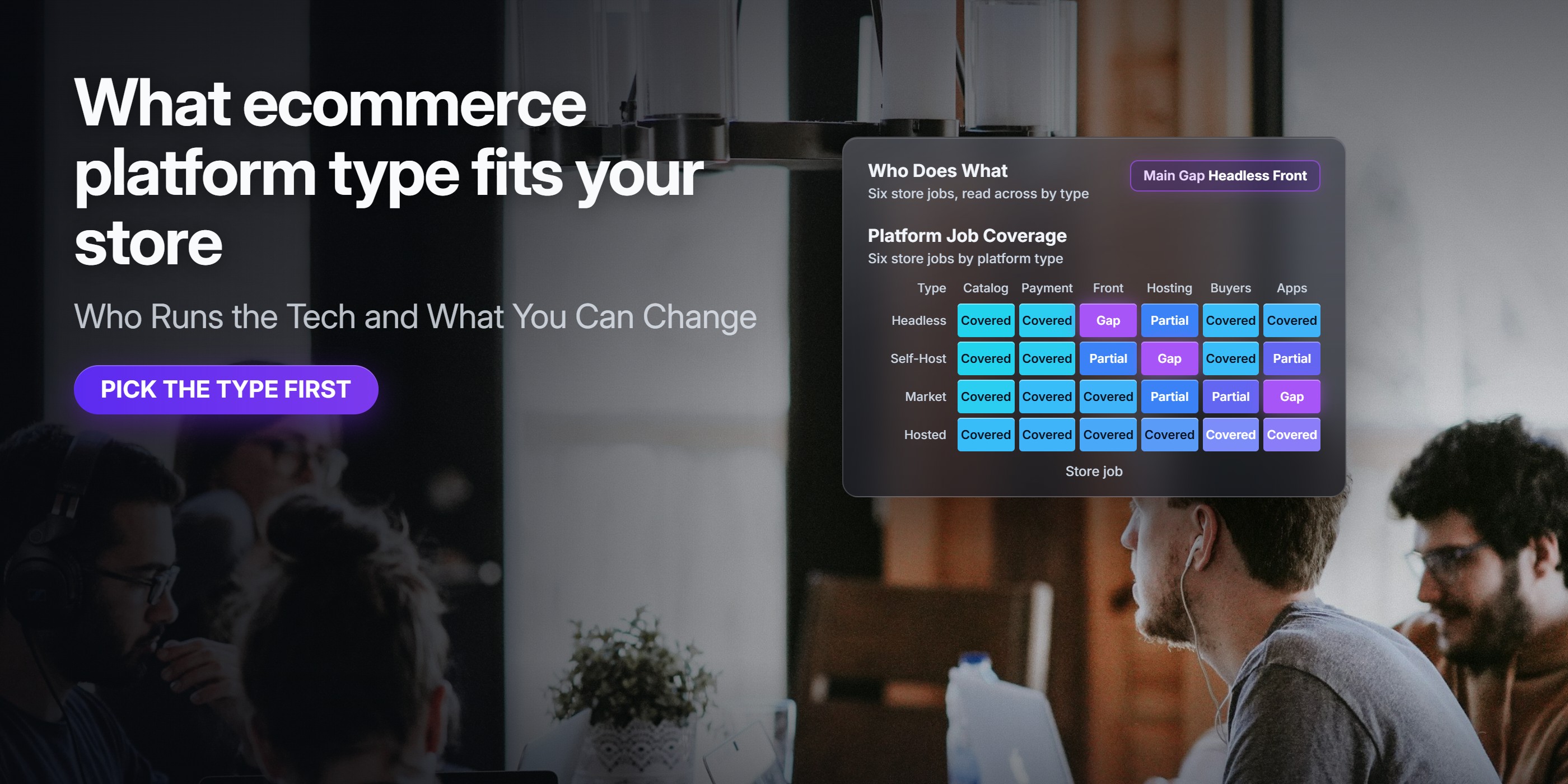
Strip away the marketing and an ecommerce platform does six jobs. Every type covers the first four. The last two are where the types differ most.
- Catalog. Products, variants such as size and color, prices, images and descriptions, organized into collections or categories.
- Checkout and payments. The cart, the checkout form, payment processing, taxes and shipping rates at the point of sale.
- Orders and inventory. Stock counts, order status, fulfillment, refunds and returns.
- Customers. Accounts, order history, and the contact data your email and marketing tools use.
- Storefront and hosting. The pages customers browse, and the servers, security certificate and uptime behind them.
- Integrations. Connections to email, accounting, shipping, reviews and ad platforms, usually through apps or extensions.
A hosted platform bundles all six. Shopify’s plans, for example, list unlimited web hosting, a custom domain and a free SSL certificate, and its pricing page advertises integration with thousands of apps. An open-source platform gives you the first four as software and leaves hosting and much of the integration work to you. A headless setup keeps the platform for the first four and replaces the storefront with one your developers build.
That’s the mental model to keep. When you compare platforms, ask which of these six jobs the platform does for you, which it lets you change, and which it leaves for you to buy, build or maintain.
What are the main types of ecommerce platforms?
There are four types of platform, plus marketplaces, which people often mix up with them. The table shows who does what in each.
| Type | Who runs the servers | What you can change | Ecommerce platform examples |
|---|---|---|---|
| Hosted SaaS | The vendor | Themes, settings, apps, some code | Shopify, BigCommerce, Squarespace, Wix, Square Online |
| Open source | You or your host | Everything, including the code | WooCommerce, for WordPress |
| Headless | The vendor for commerce, you for the storefront | The whole storefront | Shopify with Hydrogen, BigCommerce with a custom front end |
| Custom | You or your developers | Everything, built to order | Software written for one business |
| Marketplace, not a platform | The marketplace | Your listings only | Etsy, Amazon, eBay |
Read the table from top to bottom as a trade between convenience and control. The higher rows do more of the work and limit what you can change. The lower rows let you change more and hand you more of the work. Marketplaces sit apart, because you’re renting shelf space in someone else’s store rather than running your own.
For most first stores, the first row is the sensible starting point. The second and third rows suit businesses with developers on staff or on retainer. Fully custom software makes sense only for businesses whose way of selling no off-the-shelf platform supports.
How hosted SaaS platforms work
A SaaS based ecommerce platform is software you rent rather than install. You pay a monthly or yearly subscription, and the vendor runs the servers, applies security updates and keeps the checkout working. You log in through a browser, pick a theme, add products and connect a payment processor. That’s why a hosted ecommerce platform is where most new stores begin.
Entry prices are similar across the major vendors. On their US pricing pages, Shopify Basic is $39 a month on monthly billing, with yearly billing lower, and BigCommerce Core is also $39 a month for stores with up to $30,000 in trailing 12-month sales. Card processing and any fee for using an outside payment provider can easily cost more than the subscription itself, which is why the comparisons look at the whole bill. To see what the first week on a hosted platform involves, read our guide to setting up a Shopify store.
The trade-off is control. You can change themes, settings and apps, and on most platforms some code, but you can’t change how the vendor’s checkout or database fundamentally works. If the platform doesn’t support a way of selling you need, you wait for the vendor, find an app, or move to another type.
How open-source platforms work
Open-source ecommerce software is free to download, and you run it on hosting you choose. WooCommerce describes itself as the free, open-source ecommerce platform for WordPress, and its pricing page notes that it is free to download and use and takes 0% revenue share. You keep the code, so you can change anything, from the checkout to the database.
The costs and the work move to you. WooCommerce’s own pricing page puts hosting at $25 to $350 a month for most stores and paid extensions at $29 to $299 a year each. Someone has to apply updates to the core software, the theme and every extension, test them before they reach the live store, keep backups and watch for security issues. Our ecommerce platform maintenance guide sets out that cadence by stack. For a store with a developer on retainer, that’s normal work. For a solo owner, it’s a second job. Extensions also come from many different authors, so an update to one can conflict with another, which is why testing on a copy of the store before updating the live one matters more here than on a hosted platform.
That’s why a customizable ecommerce platform such as WooCommerce suits two kinds of business. One already runs WordPress and wants to add a store without a second system. The other needs changes a hosted platform won’t allow and has the technical help to maintain them.
How headless platforms work
Headless means separating the storefront, the head, from the commerce engine behind it. The platform still runs the catalog, checkout, orders and customers, and your developers build the pages customers see with their own tools, talking to the platform through its APIs. Shopify’s developer documentation describes it as getting all the power of Shopify under the hood, with complete control over the frontend, and offers Hydrogen, which it calls its official headless framework.
Headless is a capability, not a separate product tier, on several platforms. Shopify’s US pricing page lists one headless storefront on its standard plans and 25 on Plus, and BigCommerce lists headless commerce among its solutions. What changes is the work. A headless storefront needs developers to build it and to keep it running, so it suits stores with a specific design or performance goal and a team to support it.
The payoff is freedom over the shopping experience, from page speed to content-heavy layouts that a theme can’t produce. The cost is that every change to the storefront becomes a development task. A theme on a hosted platform lets a marketer add a landing page in an afternoon, while a headless storefront usually needs a developer and a release. If your store changes its pages often and has no developer on hand, that difference outweighs the speed or design gains. We cover the vendors and the trade-offs in more depth in our guide to headless ecommerce platforms.
Why a marketplace isn’t an ecommerce platform
Etsy, Amazon and eBay let you sell online, but you’re selling in their store, under their rules. The marketplace owns the storefront, the checkout and the customer relationship. You get access to shoppers who are already there, and you pay for it per listing and per sale.
Etsy’s fee policy shows the model clearly. It charges a listing fee of $0.20 for each item listed, listings expire after four months, and it charges a transaction fee of 6.5% of the price you display, plus the amount you charge for shipping and gift wrapping. Those fees buy traffic and trust, which a new store on its own platform doesn’t have. Compare that with a hosted platform, where the subscription is fixed and, if you use the platform’s own payments, there’s no extra fee per sale beyond card processing.
Many brands use both. A marketplace brings first customers and reviews, and the store on your own platform holds your customer list, your branding and your margin. The distinction matters when you plan, because growth on a marketplace builds the marketplace’s audience, while growth on your own platform builds yours.
When does a custom ecommerce platform make sense?
A custom ecommerce platform is software written for one business, rather than a product configured for it. It makes sense when the way you sell is genuinely unusual, such as complex configurable products, contract pricing that changes by customer, or marketplace features of your own, and no hosted, open-source or headless setup can handle it without constant workarounds.
It rarely makes sense for a standard product catalog. Payments, tax, security, fraud checks and checkout reliability are hard problems that platform vendors solve once for thousands of stores. Building them yourself means paying for that work and owning it forever. Most needs that feel custom can be met with an ecommerce development platform such as a headless setup, where the commerce engine is standard and only the parts you see are built to order.
If you’re weighing it, price the build and the years of maintenance together, not the build alone. Ask too who will own the code, who can fix it if the original developers move on, and how the store would move to a standard platform later if the business changes. Our breakdown of what custom builds cost walks through the ranges and where the money goes.
How B2C and B2B selling change the choice
Most platforms are built first as a B2C ecommerce platform, selling to consumers at one public price. Selling to businesses adds needs consumers don’t have, such as customer-specific price lists, minimum order quantities, quote requests, purchase orders and payment on net terms.
B2B is not a niche. UN Trade and Development, UNCTAD, found in a 2024 study of 43 economies that in almost all of them, the majority of ecommerce sales by businesses are made to other businesses or organizations. Platforms handle this in different ways. Shopify’s US pricing page lists B2B catalogs on every plan, up to three on its standard plans and unlimited on Plus, which shows how vendors gate wholesale features by tier. Open-source and custom platforms can be shaped to any B2B process, at the cost of building it.
If wholesale or trade orders are a large part of your business, put those features at the top of your checklist rather than assuming a consumer platform will cover them, and test them during the trial with a real price list.
What does it cost to run each type?
Each type charges in a different place, which is why plan prices alone mislead. These are the main lines, with an example of each from the vendors’ own pages.
| Cost line | Where it applies | Example |
|---|---|---|
| Subscription | Hosted platforms | Shopify Basic $39 a month billed monthly. Square Online’s free plan $0 |
| Card processing | Every type | Shopify Basic from 2.9% + 30¢ online. Square’s free plan 3.3% + 30¢ online |
| Fee on sales | Some hosted plans and every marketplace | Shopify Basic 2% with an outside processor. Squarespace Basic 2% online store fee. Etsy 6.5% transaction fee |
| Hosting | Open source and custom | WooCommerce puts it at $25 to $350 a month for most stores |
| Apps and extensions | Every type | WooCommerce extensions $29 to $299 a year each |
| Developer time | Open source, headless and custom | Every update, page change and integration you can’t do yourself |
The pattern is that the easier types charge more per sale and the more flexible types charge more in time. For a store with steady sales, a hosted subscription is often the smallest line once card fees are counted, and a free open-source download can become the largest bill once a developer’s hours are counted. Total the lines for a typical month of your own before you decide which type is cheap.
What ecommerce platform should you use?
Start from your situation, not from a ranking. These four questions settle the type for most stores.
- Who will maintain it? No technical help points to a hosted platform. A developer on staff or retainer opens up open source and headless.
- Do you already run a site? A WordPress site makes WooCommerce a natural add-on. A site on Squarespace or Wix can add a store in the same builder.
- How unusual is the way you sell? Standard products fit any hosted platform. Unusual pricing, configuration or B2B processes push toward open source, headless or custom.
- Do you sell in person too? Then the platform’s point-of-sale support matters as much as the website.
Two quick examples show how the questions work. A candle maker selling 40 products, with no developer and a weekend market stall, lands on a hosted platform with point-of-sale support. A parts distributor with customer-specific pricing, an in-house developer and an ERP to connect lands on open source or a headless setup, because the pricing logic and integration matter more than the theme.
Once you know the type, compare the platforms within it on total cost and fit. Our comparison of the best ecommerce platforms covers plan prices, card rates and fees on sales side by side, so you can run your own numbers through it.
What a platform won’t do for you
A platform runs the store. It doesn’t bring customers, write your product pages, take your photos or answer your support email. It’s easy to expect the platform to solve problems that are really marketing, merchandising or operations problems, and then to switch platforms when it doesn’t.
Every platform here can produce a store that sells. Once a store runs on a capable platform, sales depend mainly on traffic, product presentation and how quickly orders ship, and no platform supplies those. They depend on the work you put in after the platform choice, which is why our step-by-step guide to building an online store spends most of its time on what comes after the sign-up.
The practical test is to ask what problem you’re trying to solve before you blame the platform. If visitors arrive and don’t buy, look at the product page, the price and the checkout. If nobody arrives, no platform change will fix it.
How hard is it to change platforms later?
Harder than choosing well the first time, but not impossible. Moving means exporting products, customers and order history, mapping old page addresses to new ones so search rankings survive, replacing every app or extension, and retraining anyone who runs the store.
You can make a future move easier from the first day. Keep your domain registered in your own name, keep a master spreadsheet of products and images outside the platform, and build your email list in a tool you can take with you. On a hosted platform, test the export during the free trial. On open source, you already hold the database, which is one of the real advantages of that type.
If you do switch, plan it as a project with an owner and a launch checklist, schedule it for a quiet month, and rehearse the move on a copy of the store before you touch the live one. Switching type is a bigger move than switching vendor within a type. Moving from one hosted platform to another changes the admin and the apps, while moving from hosted to open source also hands you the servers, updates and security.
What we would do first
We’d decide the type before looking at any brand names. For most first stores, that means a hosted platform, because it lets you spend your time on products and customers rather than servers. We’d choose open source if you already run WordPress or have a developer you trust, headless only when a specific design or performance goal justifies a development team, and custom only when nothing else can sell the way you sell.
Then we’d shortlist two platforms of that type and run the same week of work on each during their trials, adding products, placing a test order, issuing a refund and exporting the data. The one that makes those jobs easy for your team is usually the right answer, whatever its ranking. We’d also write down what would make us change type in two years, such as a wholesale channel, a second country or a design the theme can’t produce, so the decision gets revisited on purpose rather than in a crisis.
Your next step is to answer the four questions above and write down the type they point to. If you’d rather have the store designed and built once you’ve chosen, our ecommerce development services page explains how we approach builds.
Frequently asked questions
What are the types of eCommerce platforms?
The main types are hosted SaaS platforms such as Shopify and BigCommerce, open-source platforms such as WooCommerce, headless setups that pair a commerce engine with a custom storefront, and fully custom software. Marketplaces such as Etsy and Amazon are often listed alongside them, but they're channels you sell through rather than platforms you run.
Is SaaS considered e-commerce?
Not by itself. SaaS, software-as-a-service, describes how software is delivered, by subscription and hosted by the vendor. Ecommerce describes selling online. The two meet in SaaS ecommerce platforms such as Shopify and BigCommerce, which are store software delivered as a subscription, but a SaaS email or accounting tool isn't ecommerce, and an open-source store isn't SaaS.
What is the difference between hosted and self-hosted ecommerce platforms?
A hosted platform runs on the vendor's servers, and the vendor handles hosting, security updates and uptime for a subscription. A self-hosted platform such as WooCommerce runs on hosting you choose and pay for, which WooCommerce puts at $25 to $350 a month for most stores, and you or your developer handle the updates and security.
What is an example of an e-commerce platform?
Shopify is an example of a hosted ecommerce platform, and WooCommerce, which runs on WordPress, is a common open-source example. BigCommerce, Squarespace, Wix and Square Online are other hosted examples. Marketplaces such as Etsy and Amazon let you sell online too, but they're channels inside someone else's store rather than platforms you run.
What's the difference between a website and a platform?
A website is the set of pages people visit, and a platform is the software that produces and runs them. An ecommerce platform adds the store functions a basic website lacks, such as a product catalog, cart, checkout, payments, inventory and order management. Website builders such as Squarespace and Wix blur the line by offering both in one product.
Is Amazon an ecommerce platform?
Not in the sense most store owners mean. Amazon is a marketplace, so you list products in its store, pay its fees and follow its rules, while it runs the storefront, checkout and customer relationship. An ecommerce platform such as Shopify or WooCommerce runs a store that you own on your own domain, and many brands use both.
Is Amazon a B2C?
Mostly, yes. Amazon's best-known business sells to individual consumers, both as a retailer and through independent sellers on its marketplace, which is what business to consumer means. For your own store, B2C means selling to individuals at public prices, which is the model most ecommerce platforms are built around first.
Can e-commerce be B2B?
Yes, and business-to-business sales make up the majority of ecommerce sales by businesses in almost all the economies UNCTAD has studied. B2B stores need features consumer stores don't, such as customer-specific price lists, quote requests, purchase orders and net payment terms. Shopify's US pricing page, for example, lists B2B catalogs on every plan, with unlimited catalogs on Plus.
How to create an e-commerce platform?
Most businesses don't create one from scratch. They choose an existing platform and configure it, or build a custom storefront on top of one through a headless setup. Building a platform yourself means writing and then maintaining the catalog, checkout, payments, tax, security and order management, which only makes sense when no existing platform can support the way you sell.
What are examples of software-as-a-service?
In ecommerce, Shopify, BigCommerce, Squarespace, Wix and Square Online are all software-as-a-service, store software you rent by subscription instead of installing. Outside ecommerce, email marketing tools, accounting software and video meeting apps commonly run the same way. The common thread is that the vendor hosts and updates the software, and you pay to use it.